“Every business deserves software that works as hard as the people behind it.”
McSaver Technologies builds focused, well-crafted software that solves real problems for real businesses. We design tools and applications that cut through complexity and help you get more done with less friction.
Whether it’s automating tedious workflows, managing time and resources, or building custom solutions for your specific needs — we create software that fits the way you work, not the other way around.
What We’ve Built
A look at the tools and applications we’ve designed and developed. Each project is built to solve a specific problem — cleanly, reliably, and with care.
McSaver Time Tracker
A full-stack time tracking and invoice management platform for 1099 contractors. Features one-tap clock in/out, automatic weekly invoice generation, calendar views, dashboards, and a dedicated client portal for managing contractors and reviewing timesheets.
McSaver Facility Explorer
A learning and research tool for exploring hazardous waste generator registries. Browse facilities, view them on an interactive map, and organize your research with personal notes — all running entirely in the browser with no server required.
McSaver Searcher
A visual query builder and database analysis studio for SQL Server. Build SELECTs by clicking instead of typing, chart any column, hunt down orphaned records, and surface every view or procedure that quietly stopped working — all from one studio.
We Build Software That Works
Need a custom tool, application, or platform for your business? We design, develop, and deploy solutions tailored to your workflow.
Custom Applications
Full-stack web and mobile applications built to your specifications. From internal tools to customer-facing platforms — we handle the design, development, and deployment.
Workflow Automation
Eliminate repetitive tasks and manual processes. We build integrations and automated workflows that connect your tools and keep your operations running smoothly.
Dashboards & Analytics
Turn your data into clear, actionable insights. We build dashboards and reporting tools that give you visibility into what matters most for your business.
Have a Project in Mind?
mcsavertechnologies@gmail.comTell us about your business and the problem you’re trying to solve. We’ll get back to you with how we can help.
The Problem
- Tracking hours in spreadsheets that get lost or forgotten
- Manually building invoices at the end of every week
- No easy way for clients to see what you've been working on
- Losing billable hours because you forgot to log them
The Solution
McSaver Time Tracker replaces the spreadsheet-and-email workflow with a purpose-built platform. Clock in with one tap when you start working. Your hours are tracked automatically. At the end of the week, generate a professional PDF invoice with one click. Your clients get their own portal to view timesheets, manage contracts, and approve entries — no more back-and-forth emails.
Everything You Need to Track Time & Get Paid
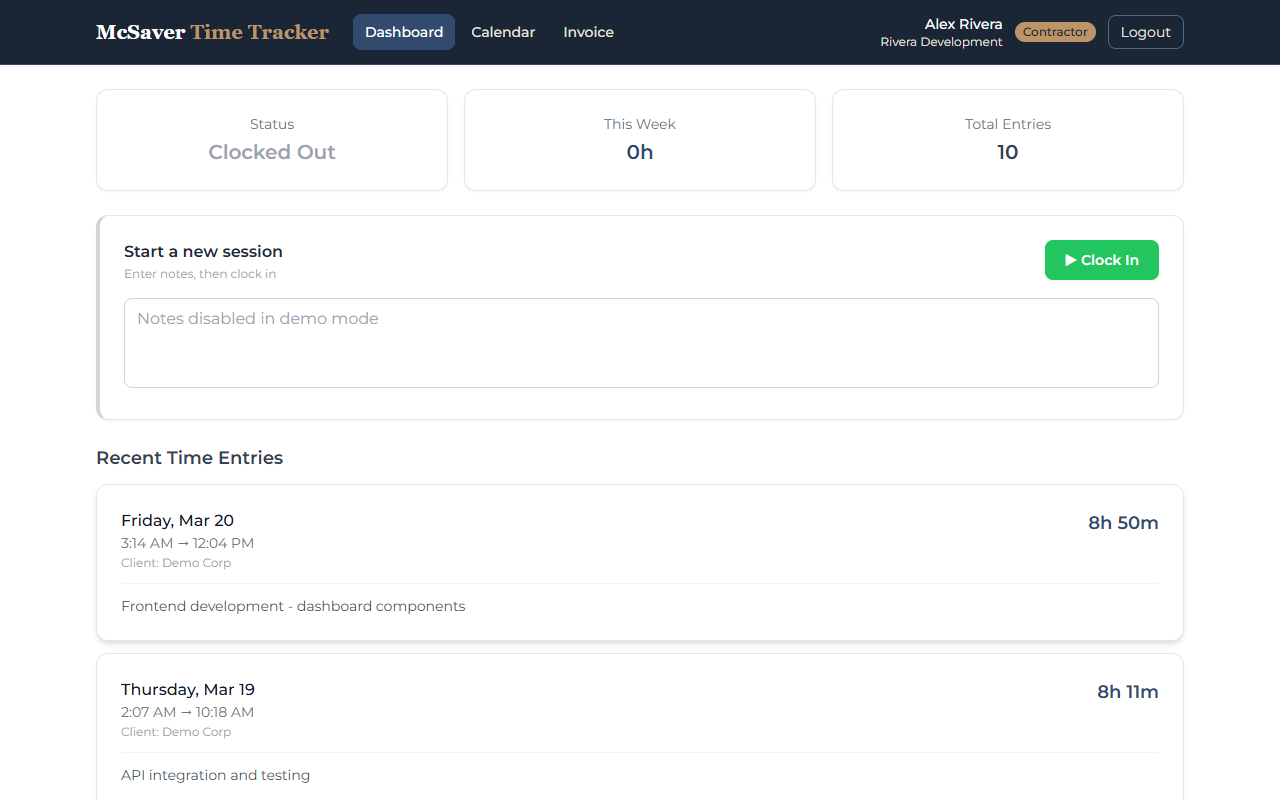
One-Tap Time Tracking
Clock in when you start, clock out when you finish. No manual entry, no spreadsheets. Your time is recorded accurately, every session.
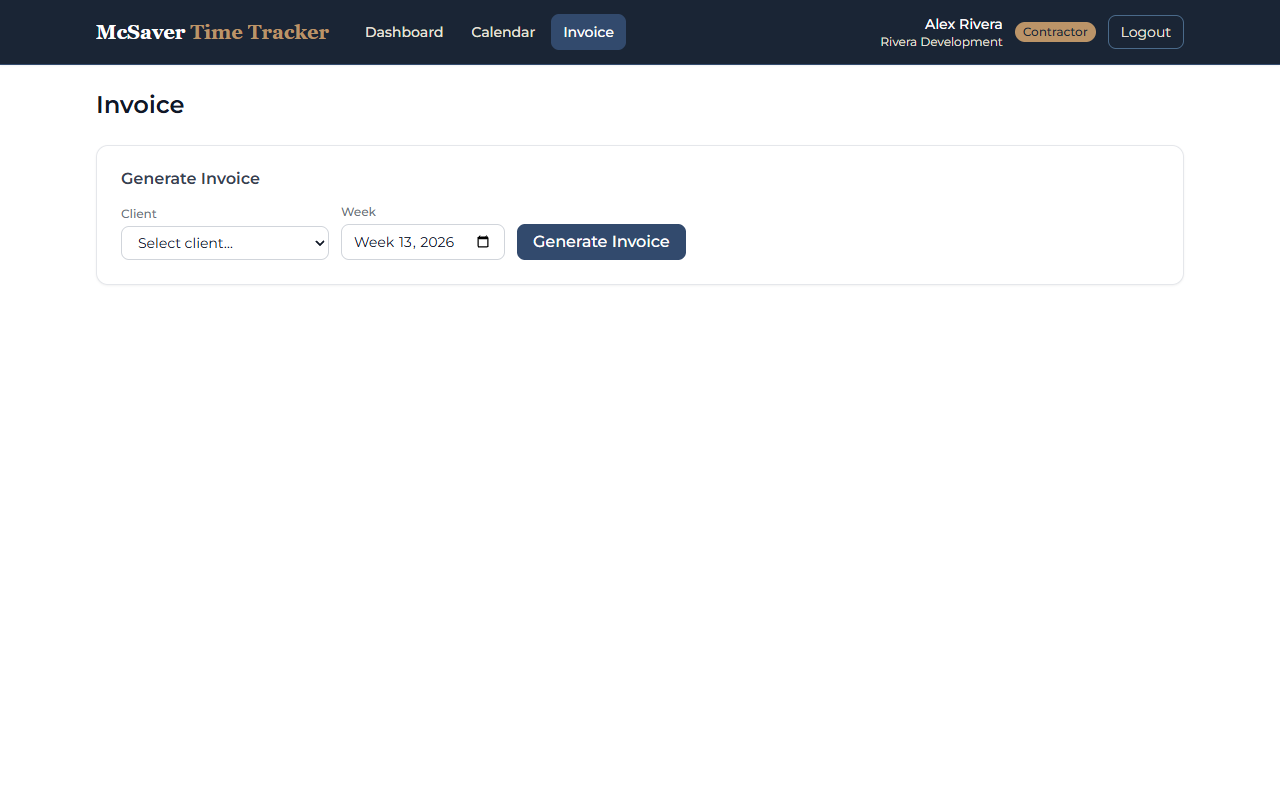
Weekly Invoice Generation
Generate professional PDF invoices from your tracked hours with one click. No formatting, no calculations — it's done for you.
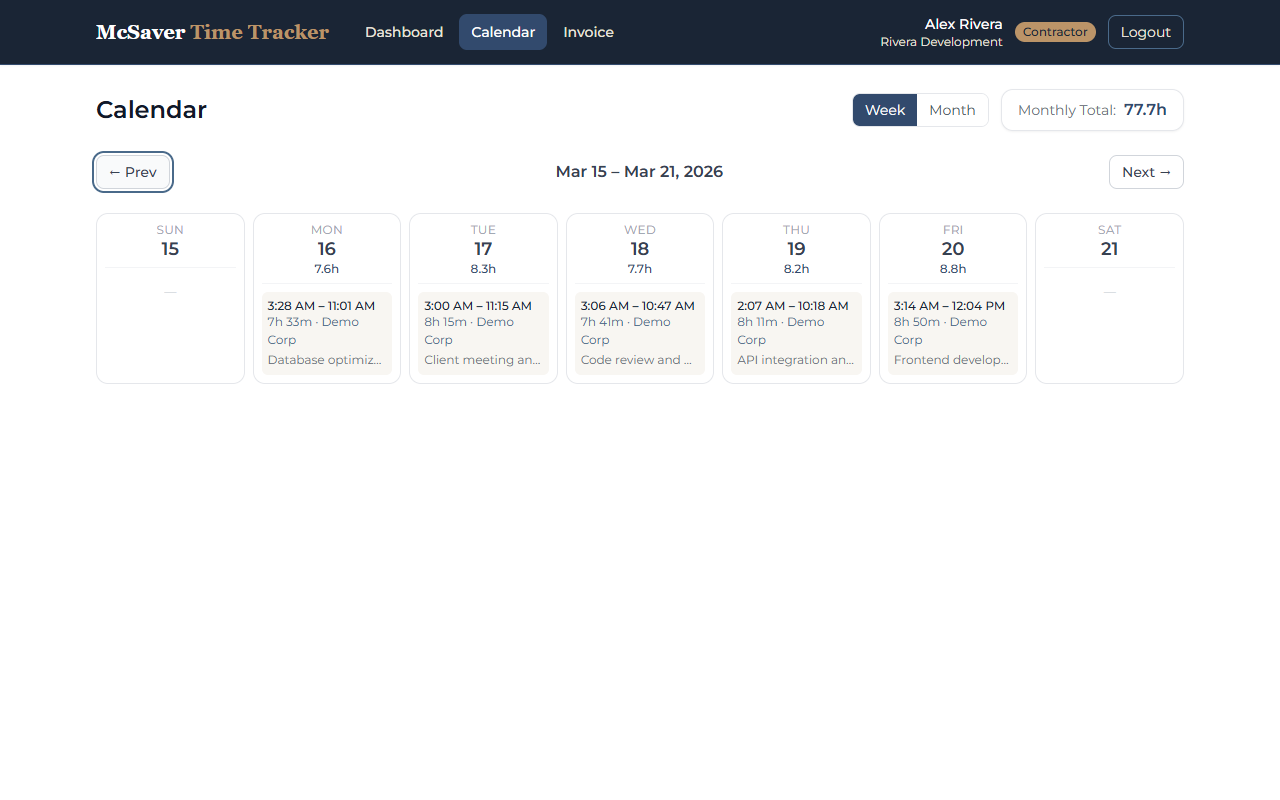
Calendar View
See your entire month at a glance. Every entry, every hour, visually mapped on a clean calendar. Spot patterns and never miss a day.
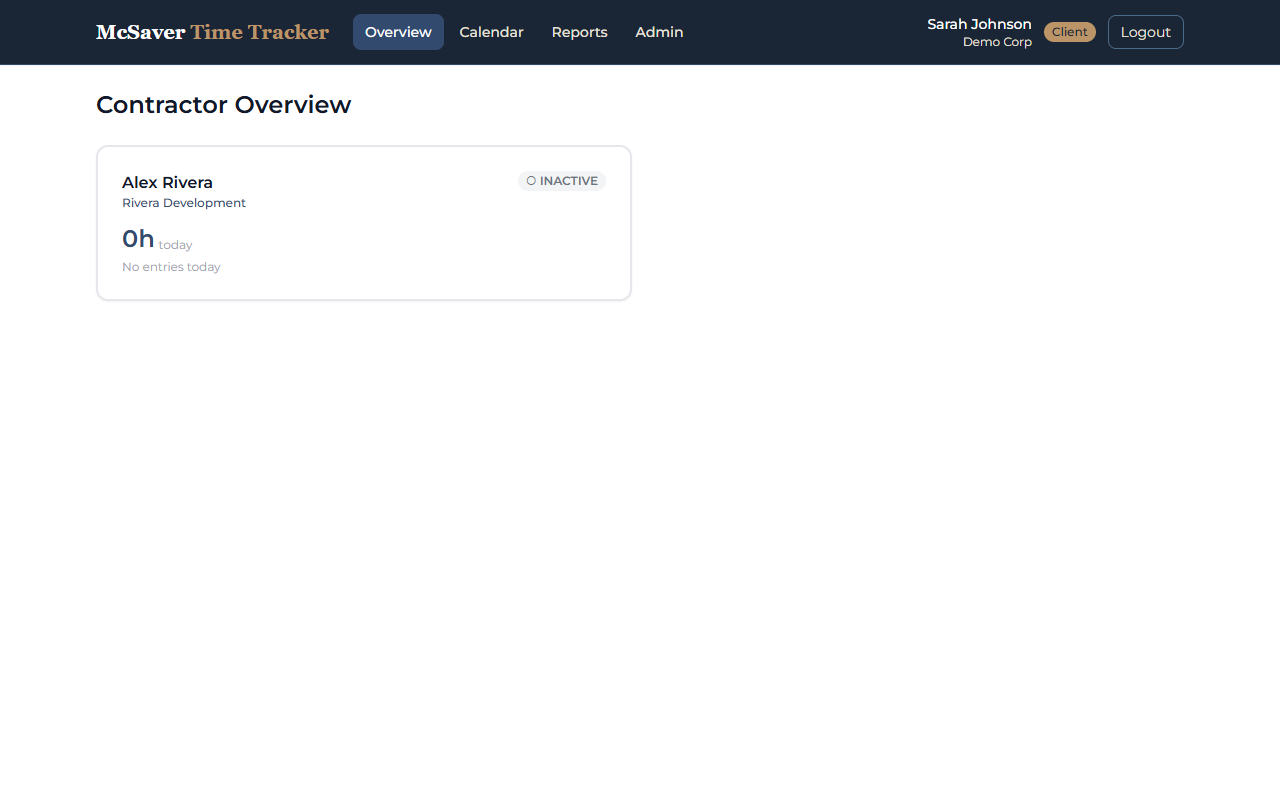
Dashboard & Reports
Real-time summary of your hours, weekly totals, and earnings. Know exactly where your time goes with clear, useful reports.
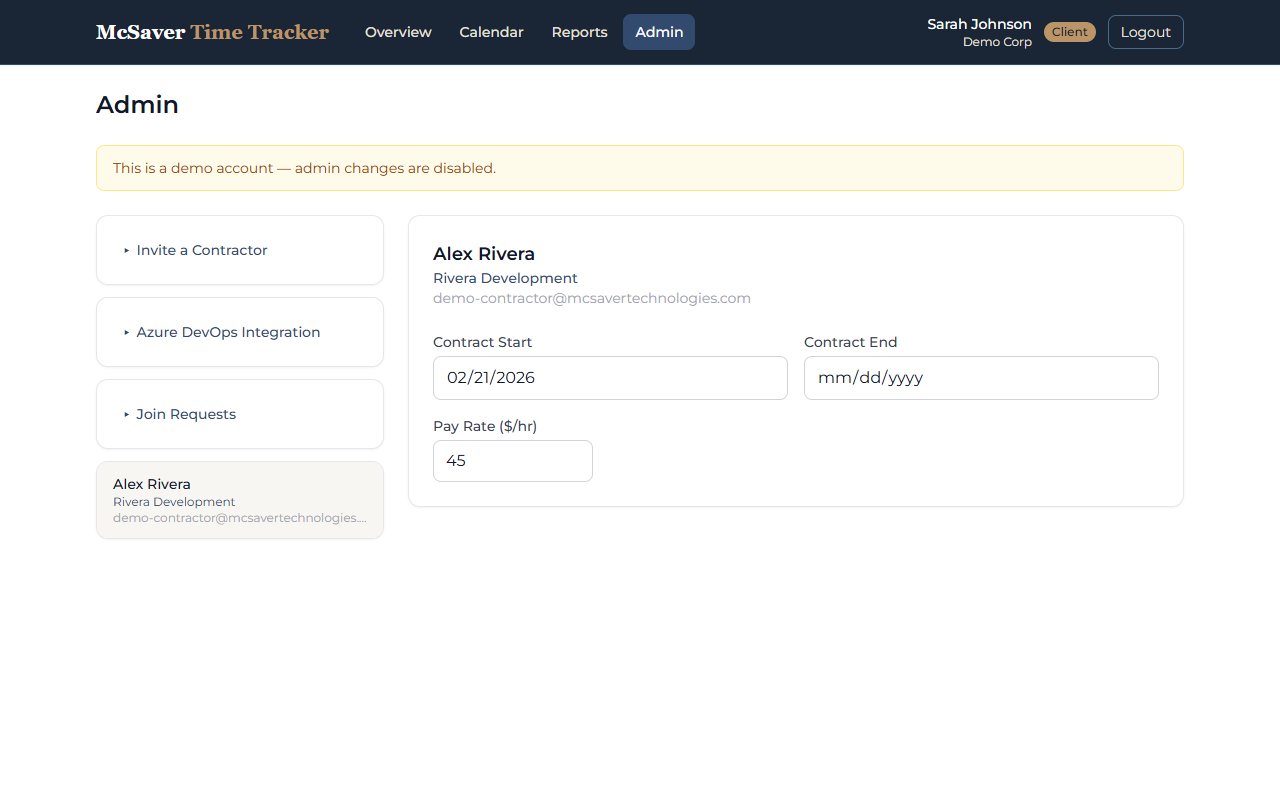
Client Portal
Clients get their own view to manage contractors, review timesheets, approve time entries, and track contract details.
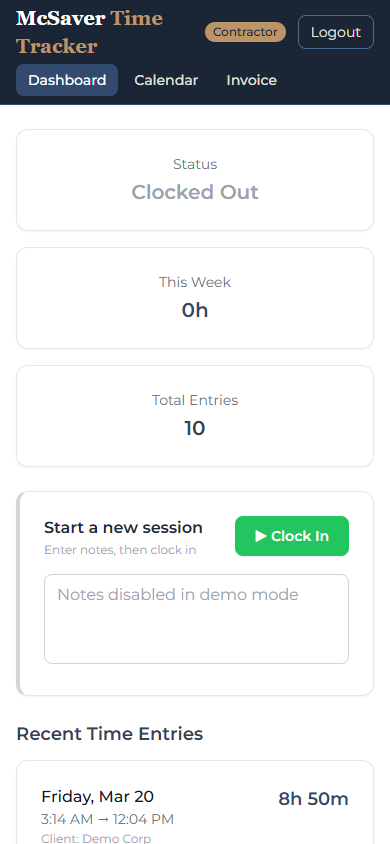
Mobile & Web
Works on any device. Track time from your phone on the job site, review reports on your tablet, or manage everything from your desktop.
Three Steps to Better Time Management
Create Your Account
Sign up in under a minute. No credit card required. Set up your profile and you're ready to go.
Track Your Hours
Clock in when you start working. Clock out when you're done. Add notes if you need to. It's that simple.
Generate & Send Invoices
One click creates a professional invoice from your tracked time. Export as PDF and send to your client.
Why Contractors Choose Time Tracker
Save Hours Every Week
Stop copying data between spreadsheets. Track time in real-time and generate invoices instantly from your entries. Reclaim the hours you used to spend on admin.
Stay Organized
Calendar view, weekly dashboard, and searchable history keep every hour accounted for in one place. No more hunting through emails and files.
Get Paid Faster
Professional invoices generated from accurate time data mean fewer disputes and faster payment cycles. Your clients see exactly what they're paying for.
The Challenge
- Hazardous waste generator registries are difficult to navigate and explore
- Understanding facility types, waste classes, and geographic distribution requires tedious manual work
- No easy way to bookmark, annotate, or organize research across facilities
- Existing data tools require internet connectivity and complex setup
The Solution
McSaver Facility Explorer turns public waste generator registries into an intuitive research tool. Browse facilities by waste class, industry, or location. View them on an interactive map to spot geographic patterns. Add personal notes and bookmarks to organize your research. Everything runs entirely in the browser using SQLite-wasm — no server, no login, no internet required after first load.
Everything You Need to Explore Effectively
Search & Filter
Instantly search facilities by name, waste class, industry category, or location. Virtual scrolling handles massive datasets without slowing down.
Interactive Dashboard
See key metrics at a glance: facility breakdowns by city, waste class distribution, and your bookmarked items. Stay focused on what matters.
Map Visualization
See facilities plotted on an interactive map. Color-coded markers help you spot geographic clusters and explore regional patterns at a glance.
Bookmarks & Status
Mark facilities of interest and track your exploration progress. Organize your research by tagging facilities as reviewed, noteworthy, or for later.
Notes & Annotations
Add timestamped notes to any facility. Record observations, questions, or insights as you explore. Your notes are saved locally and always accessible.
Fully Offline
Runs entirely in the browser using SQLite-wasm. No server, no account, no internet required after first load. Your data stays local and loads instantly.
Three Steps to Better Research
Open the App
The app comes pre-loaded with a hazardous waste generator facility database. Open it in any browser and the full dataset is ready to explore.
Browse & Explore
Filter by waste class, industry, or location. Use the interactive map to discover geographic patterns. Dive into facility details to learn about waste streams and registration data.
Save Your Research
Bookmark interesting facilities, add personal notes, and track which ones you've reviewed. Your research is saved locally and ready whenever you return.
Why Use the Facility Explorer
Explore Effortlessly
Stop scrolling through raw registries. Powerful search, filtering, and an interactive map make it easy to find and understand facilities in any region.
Stay Organized
Bookmarks, notes, and status tracking keep your research structured. Every facility you explore has a clear record of your observations and progress.
Zero Setup Required
No servers to configure, no accounts to create, no internet required after first load. SQLite-wasm keeps everything in the browser — open it and start exploring.
The Problem
- Orphaned foreign keys piling up unnoticed
- Broken views and stored procedures discovered by users
- Undocumented columns nobody remembers
- Slow unfiltered queries hiding in production
The Solution
McSaver Searcher turns the whole database into something you can click. Point at a table and it shows you the data, the value distributions, the dependencies, and the things that are quietly broken — then helps you fix them, safely. One studio, nine focused workspaces, zero SQL required.
Everything You Need to See Your Database Clearly
Visual Query Builder
Click tables, columns, filters, and joins. Watch the SQL build itself and results stream in. Supports aggregates, ordering, ranking, window functions, and expressions — without typing a SELECT.
Table Editor & Live Charts
Excel-style filtering and sorting on any table. One click turns a column into a chart so outliers and skew jump out — eleven chart types, no export needed.
Orphan Finder
Scan every foreign key for child rows whose parent is gone. Generate transactional cleanup scripts with row-count guards that roll back on mismatch — safe by default.
Database Analyze
Score your schema against best-practice rules — missing keys, naming, indexing, documentation. Auto-generated T-SQL fixes come ready to review and run.
Broken-SQL Validator
Validate every view, stored procedure, and function against the live schema. Surface the ones that no longer compile before your users find them.
Investigate & Data Chain
Drill into column usage, distinct value distributions, and dependencies in both directions. Build dependency-ordered delete chains that respect every foreign key — fully transactional.
Write SQL by Clicking, Not Typing
Pick a root table, check the columns you want, drag conditions into groups, and McSaver Searcher writes the SELECT for you — joins, GROUP BY, window functions and all. The generated SQL and the results update as you go.
- Tables, joins, filters, aggregates & ordering — visually
- ROW_NUMBER, RANK, LAG/LEAD, percentiles & expressions
- Save as criteria, SQL, view, procedure or function
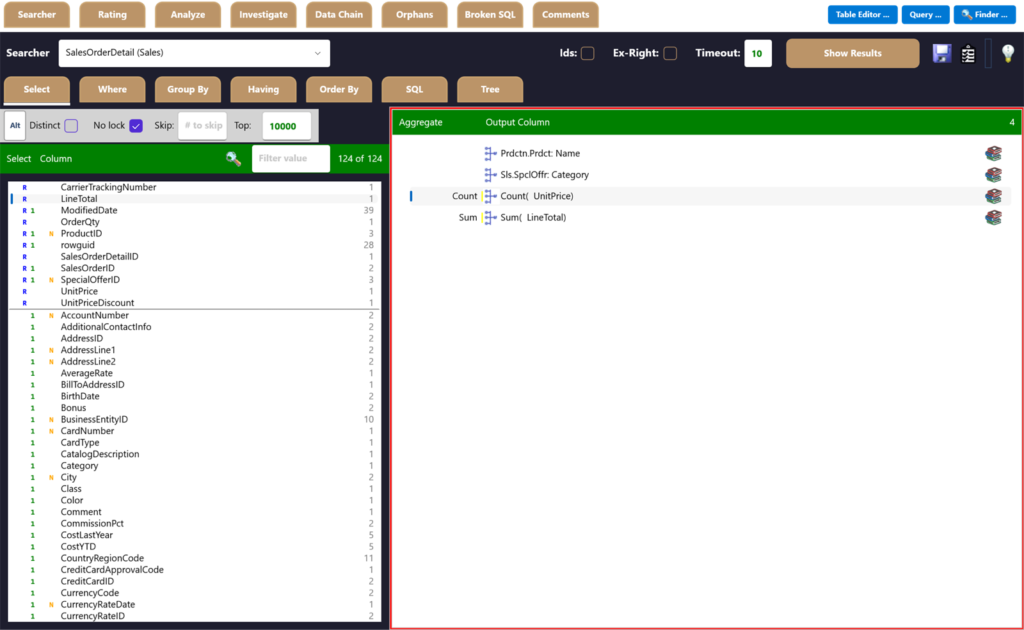
How a Query Comes Together
Build it by pointing and clicking, watch the SQL write itself, then get answers — no hand-coding at any step.
Pick Columns & Aggregates
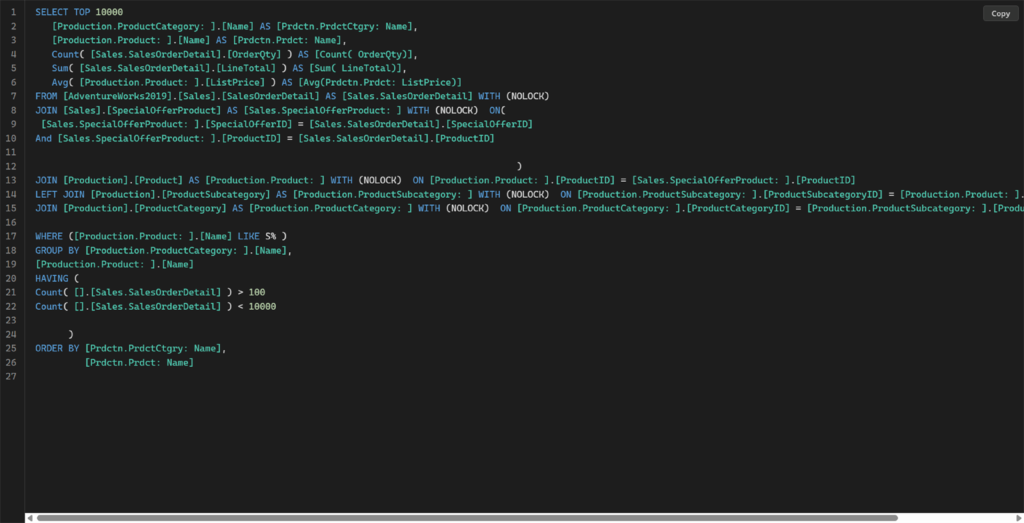
Choose output columns and add COUNT, SUM and AVG visually — here, product category and product name with order quantity and line-total rollups.
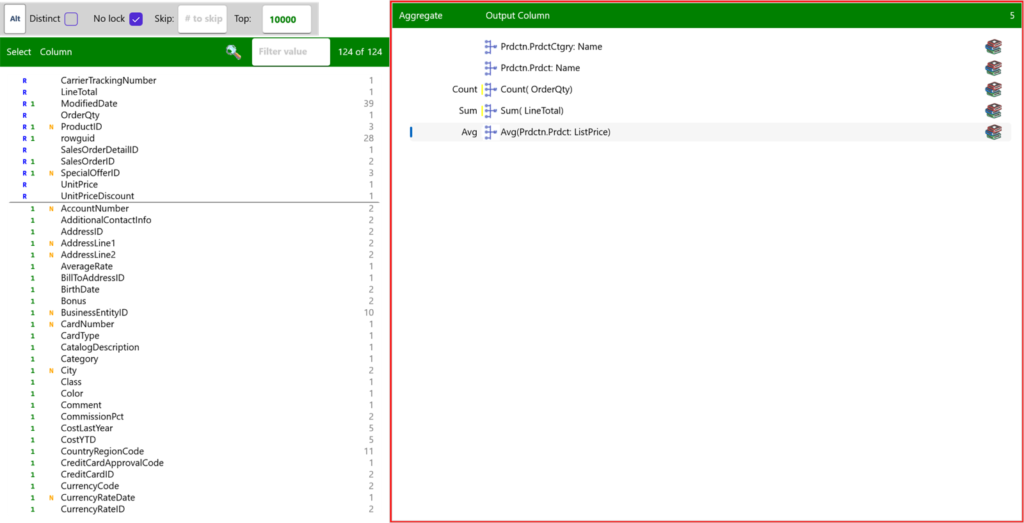
The SQL Writes Itself
Joins, GROUP BY, HAVING and ORDER BY are generated for you from the choices above — review or edit the raw T-SQL any time.
Run & Get Answers
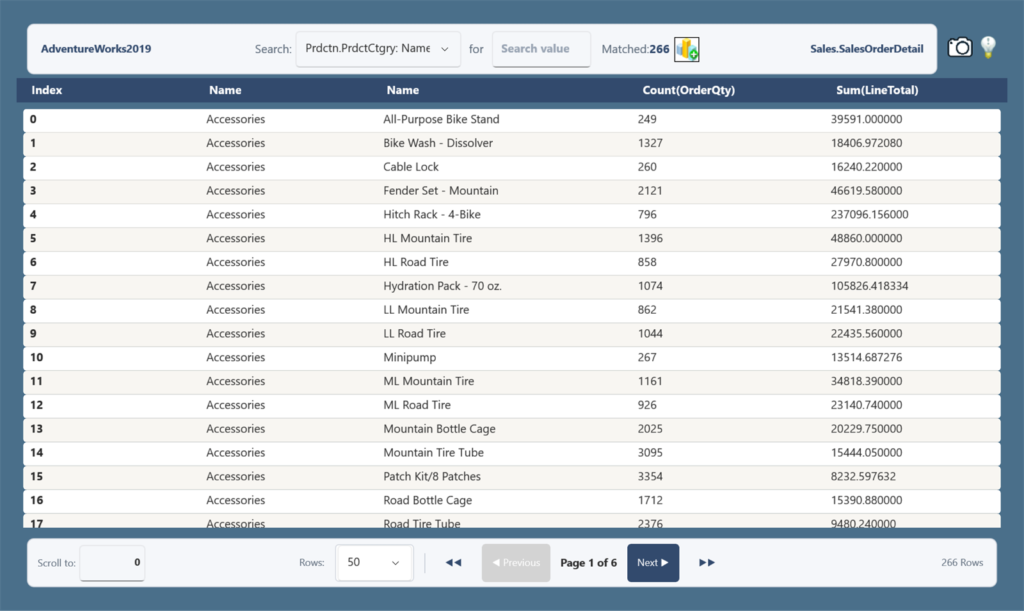
Execute and page through real results — 266 product categories here, each with its order count and summed line total.
Window Functions & Expressions, Built Visually
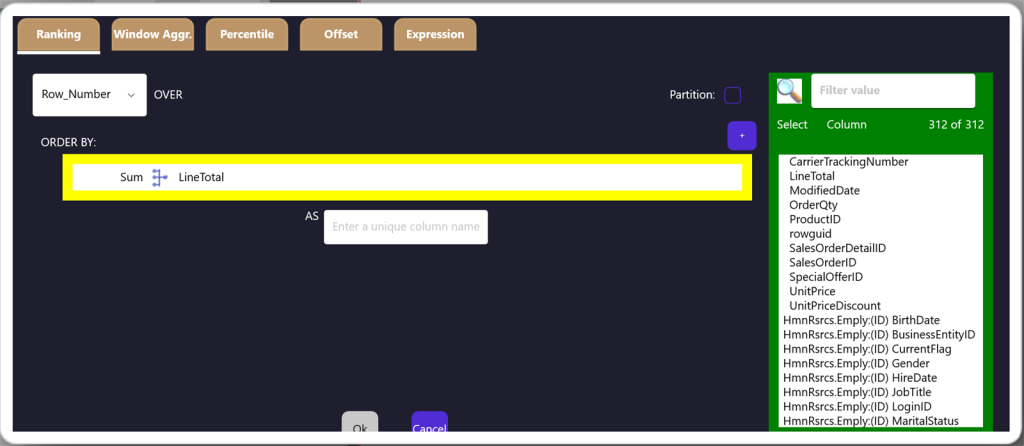
On the Select tab, the dictionary icon on any column opens an advanced editor — ranking, windowed aggregates, percentiles, offsets, and free-form expressions — so you get the power of OVER() and computed columns without writing the syntax.
Ranking
Number or rank rows within a partition — ROW_NUMBER, RANK, DENSE_RANK — ordered however you choose, without collapsing the rows. Ideal for "top N per group" and leaderboards.
Window Aggregate
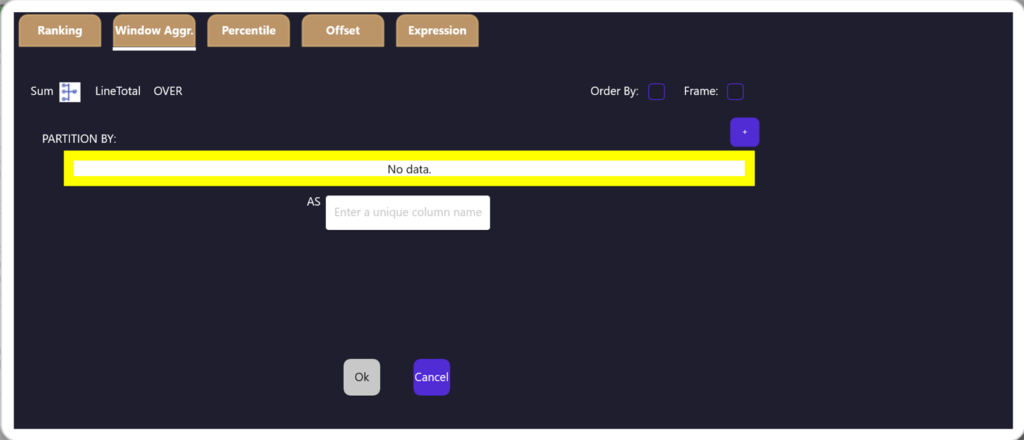
Run SUM, AVG, COUNT, MIN/MAX OVER() a partition, so every row keeps its detail and shows the group total beside it — running totals and percent-of-group made easy.
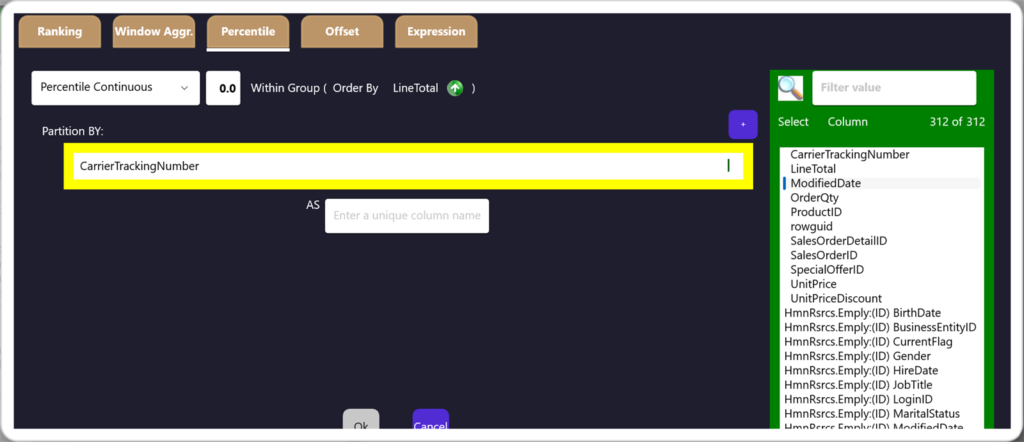
Percentile
Report medians and percentiles — PERCENTILE_CONT or PERCENTILE_DISC — within an ordered group, so you describe the middle of the distribution, not just the average.
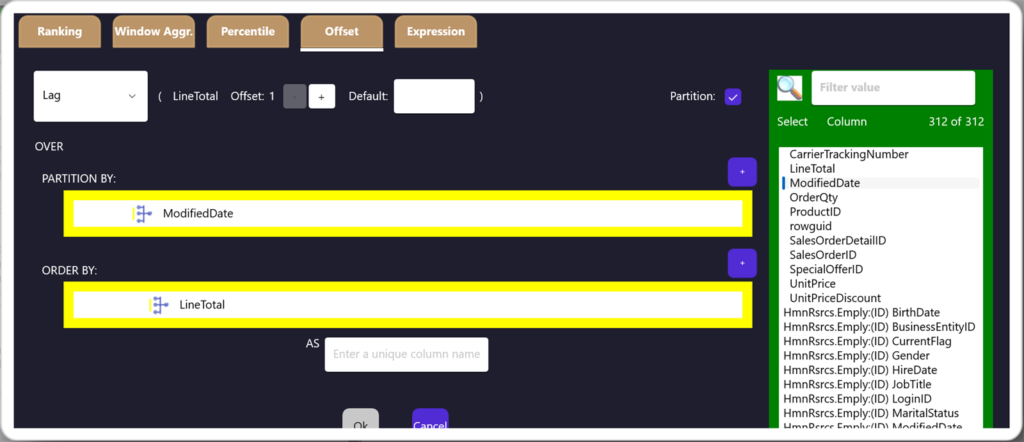
Offset
Compare each row to its neighbours with LAG and LEAD — pull a value from a prior or following row, with an offset and a default, for period-over-period change.
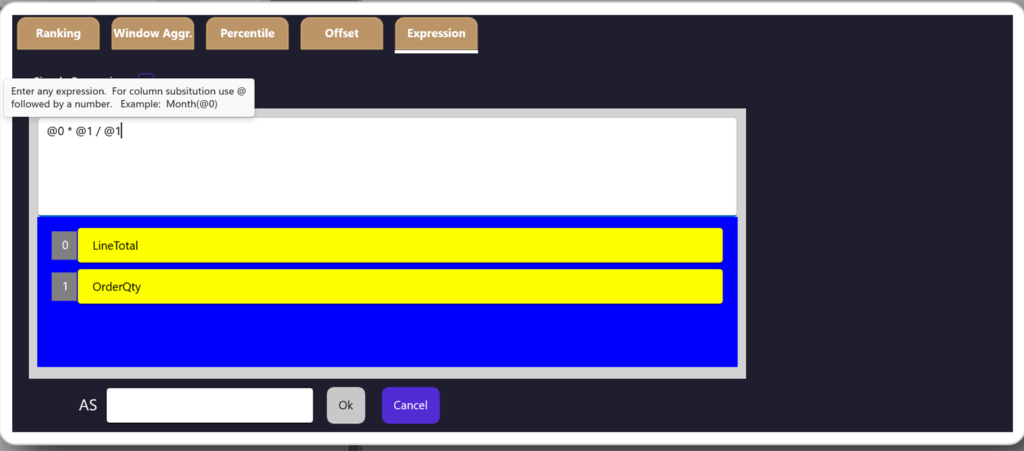
Expression
Write a free-form formula like @0 * @1 / @2 and map each placeholder to a column — calculated columns, ratios, and CASE logic that live in the query, not a downstream spreadsheet.
From Query to Chart in One Click
Pick two columns, choose a type, and the Charting Window draws it instantly. No export, no spreadsheet, no pivot dance — your result set becomes a chart right where you searched.
Single Series, Instantly
One column on X, one on Y — that's a chart. Bucket, summarize, and relabel inline, then flip between Bar, Line, Area, or Pie without re-running the query. The shape of your data shows up before you finish thinking about it.
Multiple Series, Just as Fast
Add more series and compare them side by side on the same axes — grouped bars, layered lines, stacked areas. Color, legend, and scaling are handled for you, so a multi-series comparison is the same one click as a single one.
Eleven Chart Types in the Type Dropdown
Real Screens, Real Data
Every workspace below is McSaver Searcher connected live to a sample database. Click any image to enlarge.
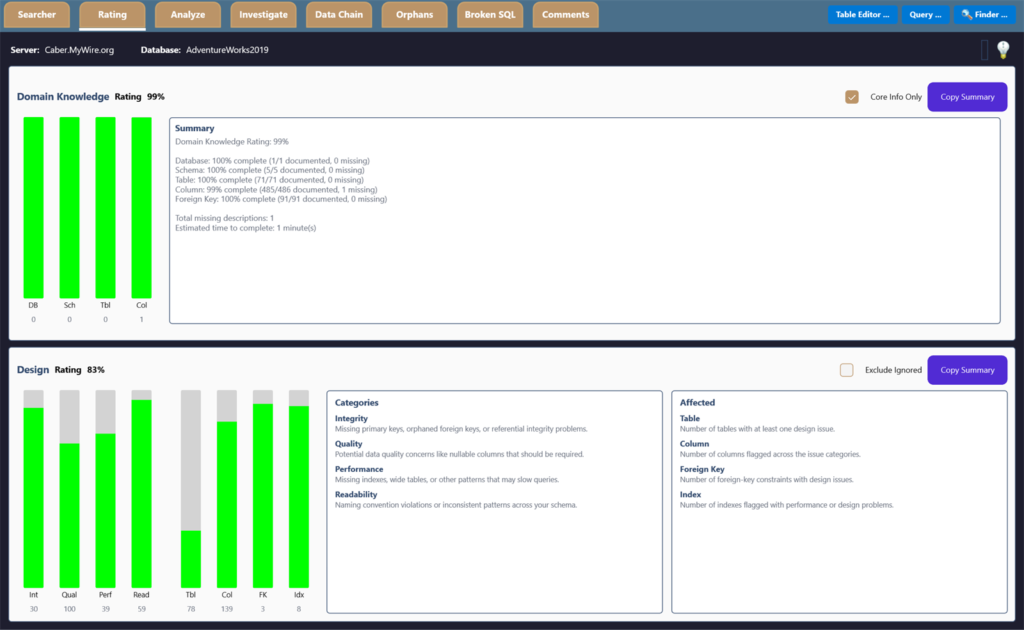
Score Your Schema at a Glance
Domain-knowledge and design ratings break down across tables, columns, keys and indexes — and climb as you fix things.
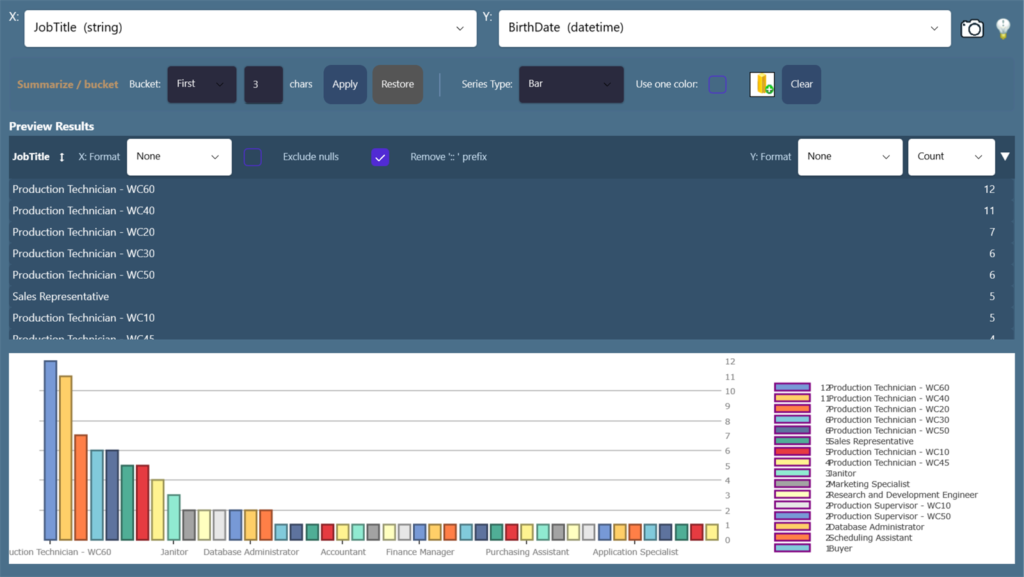
Chart Any Column on the Fly
Bucket, summarize and plot value distributions instantly to spot outliers and skew — eleven chart types, no export needed.
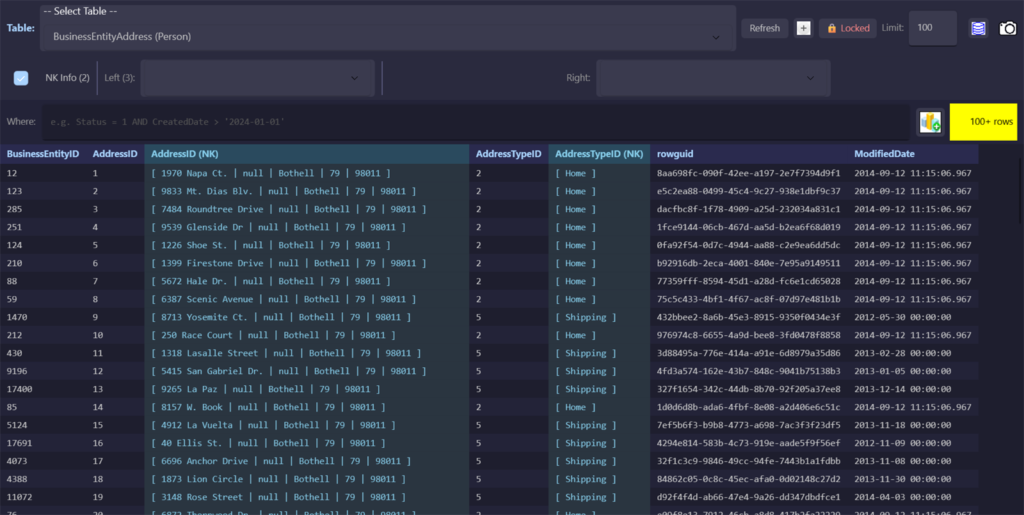
Browse and Edit Any Table
Excel-like filtering and sorting on every column, with natural-key info and one-click foreign-key navigation left and right.
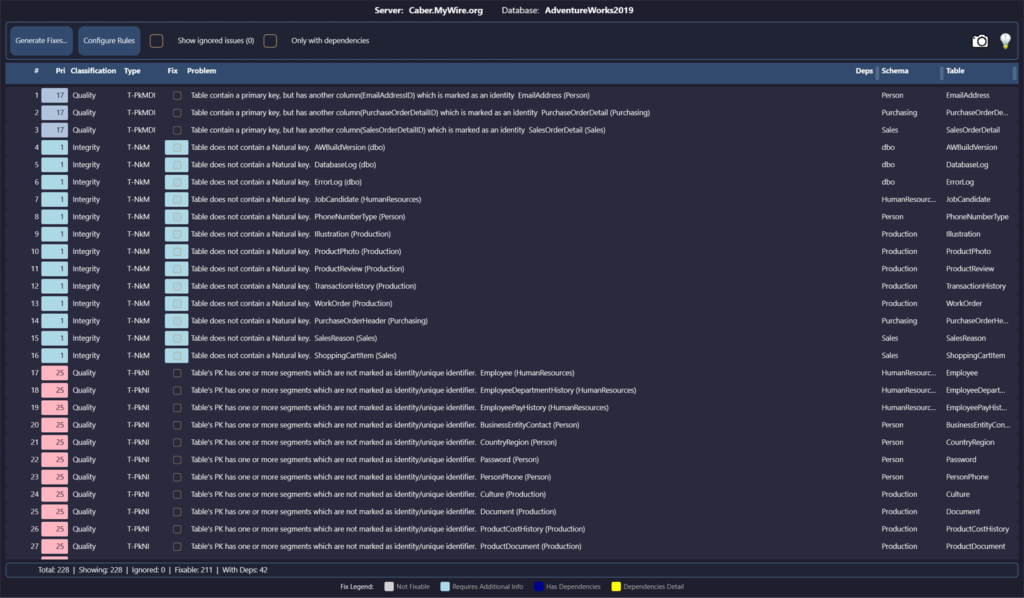
Find Every Best-Practice Gap
Integrity, quality, naming and documentation rules scored across the whole schema, each with generated T-SQL fixes.
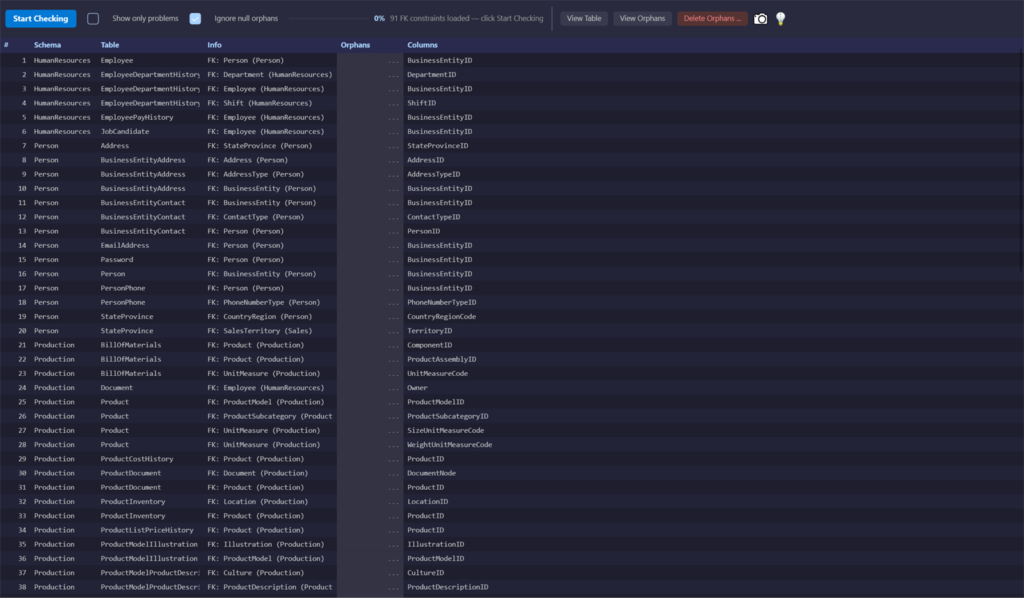
Hunt Down Broken Relationships
Scan every foreign key for child rows whose parent is gone, then generate safe, transactional cleanup scripts.
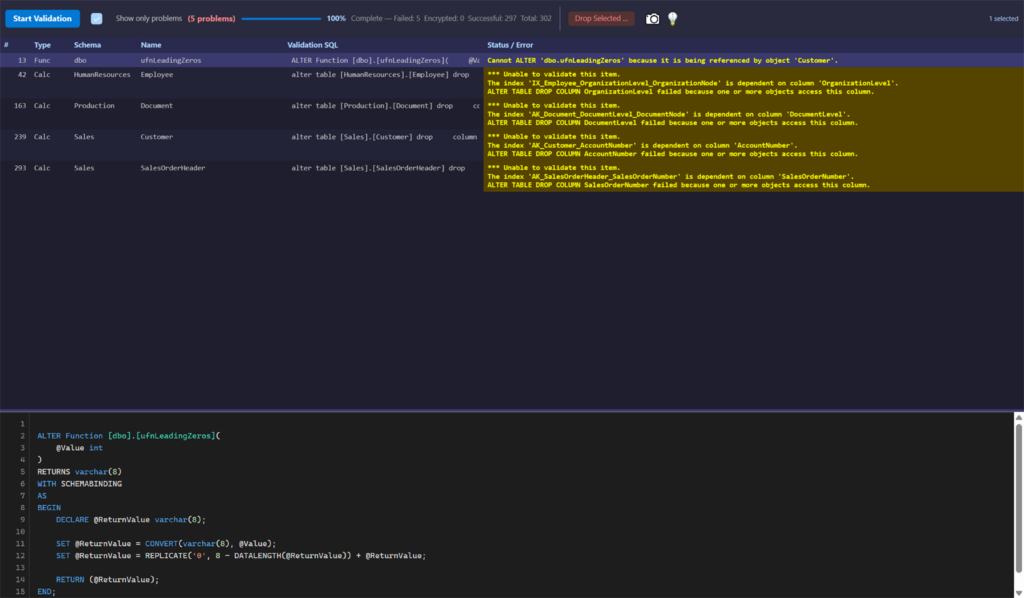
Catch What Stopped Compiling
Validate every view, procedure and function against the live schema — surfaced in seconds, before your users find them.
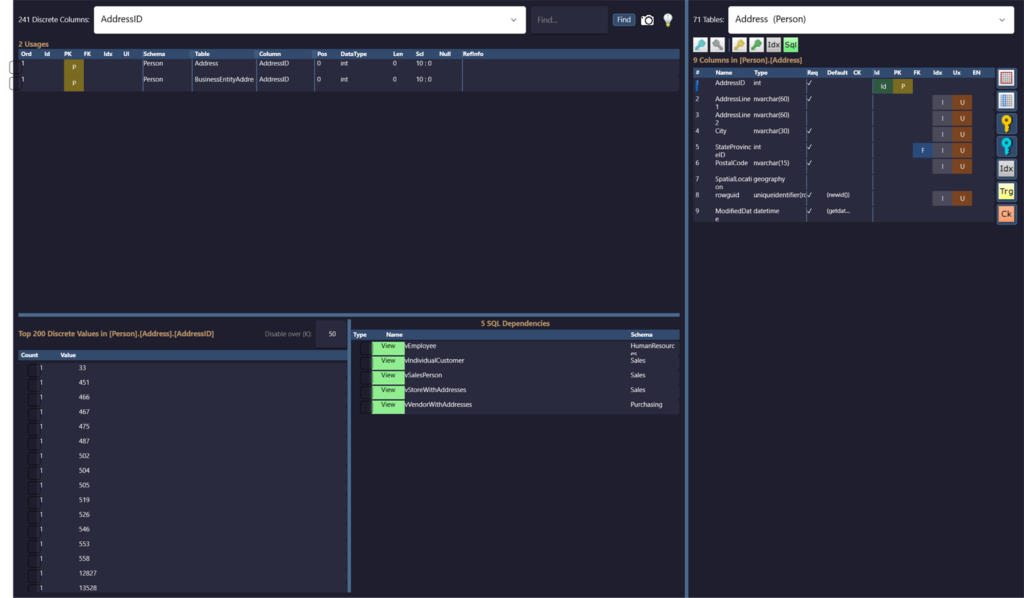
See What References What
Drill into a column's usages, discrete value distribution and every dependency — in both directions across the database.
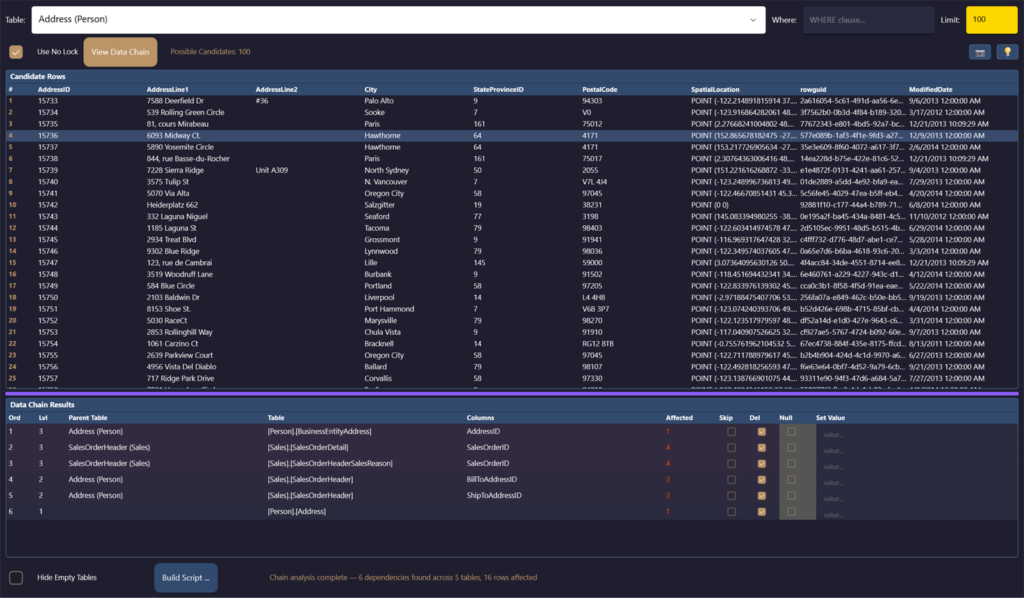
Delete in the Right Order
Build transactional, dependency-ordered delete scripts that respect every foreign key — a record and all that hangs off it.
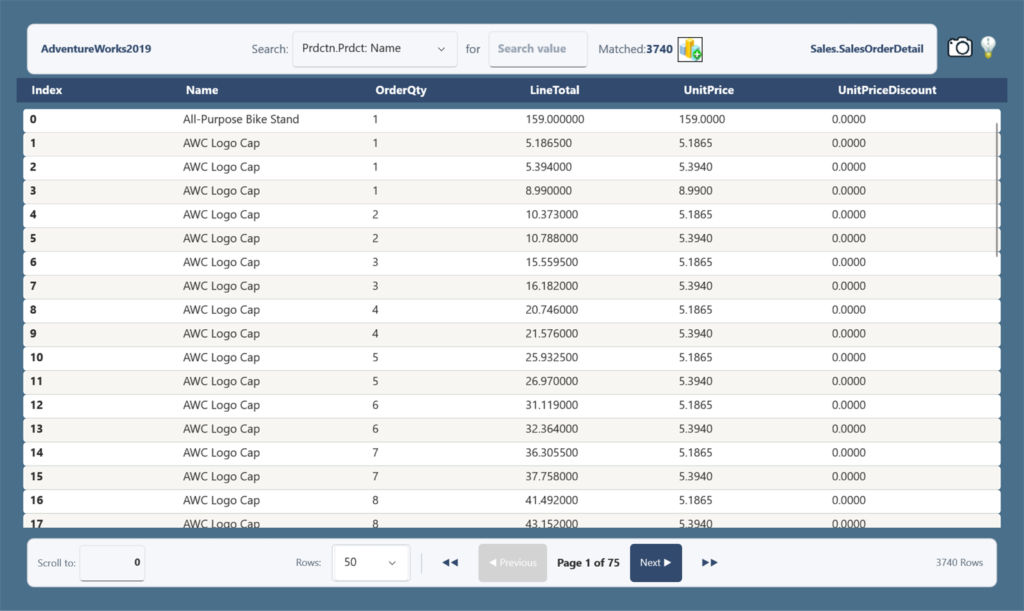
Query Without Writing SQL
Pick predicates, run, and page through results — thousands of matched rows, no code required.
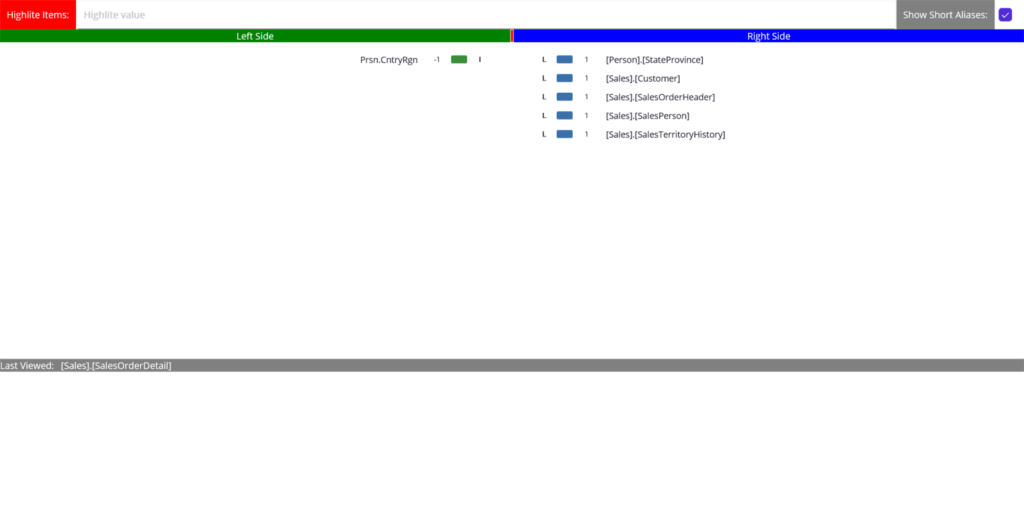
Navigate the Relationships
Browse the schema as a tree — pick any table and see what it links to on the Left and Right of the join path, then re-root your query on any of them.
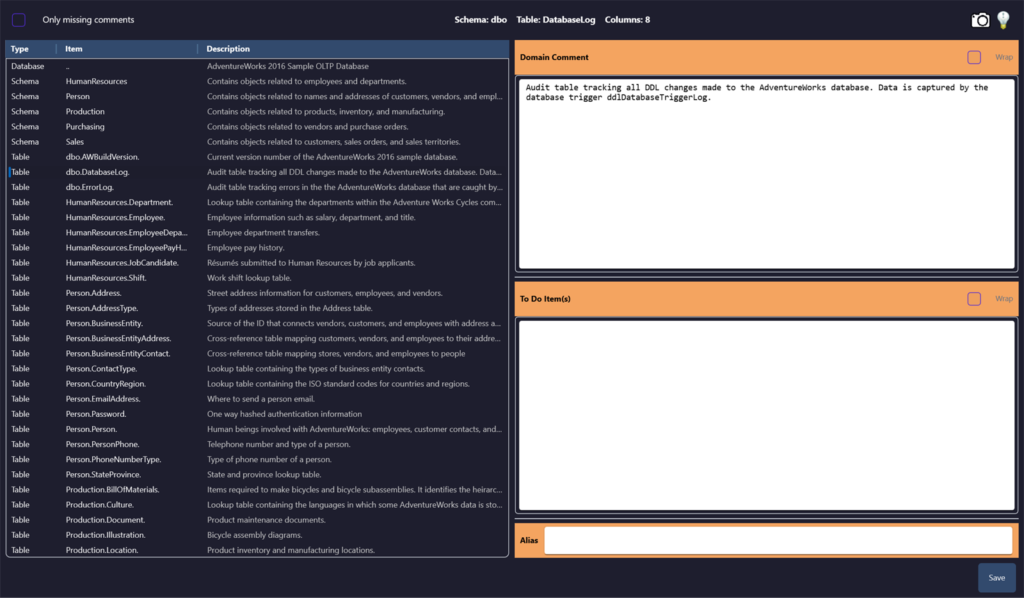
Document It in Place
Manage extended-property descriptions, to-dos and aliases that flow back into tooltips and your generated queries.
Help, Right Where You Need It
McSaver Searcher explains itself as you work — and a full manual set is one click away whenever you want the complete picture.
💡 Context-Sensitive Tip of the Day
Every workspace carries its own rotating tips. Click the lightbulb icon in any tab's header to cycle through guidance written specifically for that view — from the Searcher's query-building shortcuts to the Orphans scanner's safety notes and the Chart window's series types.
📄 A User Manual for Every Tab
Twenty-six PDF manuals — one per tab and sub-tab — each covering Who, What, When, Where and Why, with a screenshot and the tab's complete Tip of the Day list. Download any of them below.
Main Feature Tabs
Window-Function Tabs
Window-Level Tools
Results & Visualization
What We Track — and What We Never Touch
McSaver Searcher runs on your machine, against your database. Here is exactly what does and doesn't see.
What We Collect
- Your email address — it's how you sign in and how we reach you.
- Your login password — kept only as a secure one-way hash. We can never read or recover it.
- Which features you use, and how often — Searcher, Rating, Analyze, Investigate, Data Chain, Orphans, Broken SQL, Comments, Table Editor, Query and Finder — so we know what to improve.
- Your purchases and subscriptions — the plan, amount and status, so we can manage your license (never your card).
- For security & licensing — your name (if you give it), the computers you activate on, your app version, and sign-in activity including IP address.
What We Never See or Store
- Your credit-card details — payments go straight to Stripe. We only ever receive Stripe's confirmation, never your card number, expiry or CVV.
- Your database password — it stays on your computer, encrypted, and only if you choose to save it. It is never sent to us.
- The SQL you write or the data you browse — your queries and the tables, columns and rows you look at never leave your machine.
- Your mailing address — we don't collect it; if a purchase ever needs one, Stripe handles it.
- Your location — we don't track or infer where you are.
Diagnostic logs may include account identifiers to troubleshoot errors.
Three Steps to a Database You Can See
Connect to Your Database
Point Searcher at any SQL Server or Azure SQL connection. Schema, keys, and procedures load in seconds — no setup, no project files.
Click, Don't Type
Build queries, scan for orphans, score documentation, validate every view — all by pointing at what you want to look at. No SQL syntax in your way.
Apply Safe Fixes
Every generated cleanup script is transactional and guarded with row-count checks. Review it, run it, move on — confident it can't make things worse.
Why Teams Choose Searcher
Stop Writing Boilerplate SQL
The visual builder generates correct, formatted SELECTs with joins, filters, windows, and ranking. Spend your time on the question, not the syntax.
Find Hidden Database Rot
Orphaned rows, broken views, undocumented columns — all surfaced before they reach production. Built-in scoring tells you what to fix first.
Fix Things Safely
Every cleanup script wraps in a transaction with row-count guards. If the numbers don't match, the change rolls back — your data stays safe.
Two Editions, One Studio
Start with Base at $19.99 — every visual query you'd want, every chart your data deserves. Step up to Plus at $49.99 when you're ready to repair the schema itself, not just query it.
Searcher Base
Write SQL by clicking. Chart any column. One simple price.
- Searcher — full visual query builder with joins, aggregates, GROUP BY, window functions and expressions
- Rating — visual analysis of your schema with an executive summary across tables, columns, keys and indexes
- Built-in Charting — all eleven chart types, one click from any result set
- Save queries as SQL, view, procedure or function
Searcher Plus
Repair the database, not just query it.
- Analyze — score the schema against best-practice rules and generate T-SQL fixes
- Data Chain — build transactional, dependency-ordered delete scripts that respect every foreign key
- Investigate — drill into column usage, value distributions and dependencies in both directions
- Orphans & Broken SQL — hunt orphaned rows and catch views that no longer compile
- Comments — manage extended-property documentation across the database
- Finder — full-text search across every view, procedure and function
- Table Editor & Query — Excel-style browsing and a saved query manager
We Care About What You Think
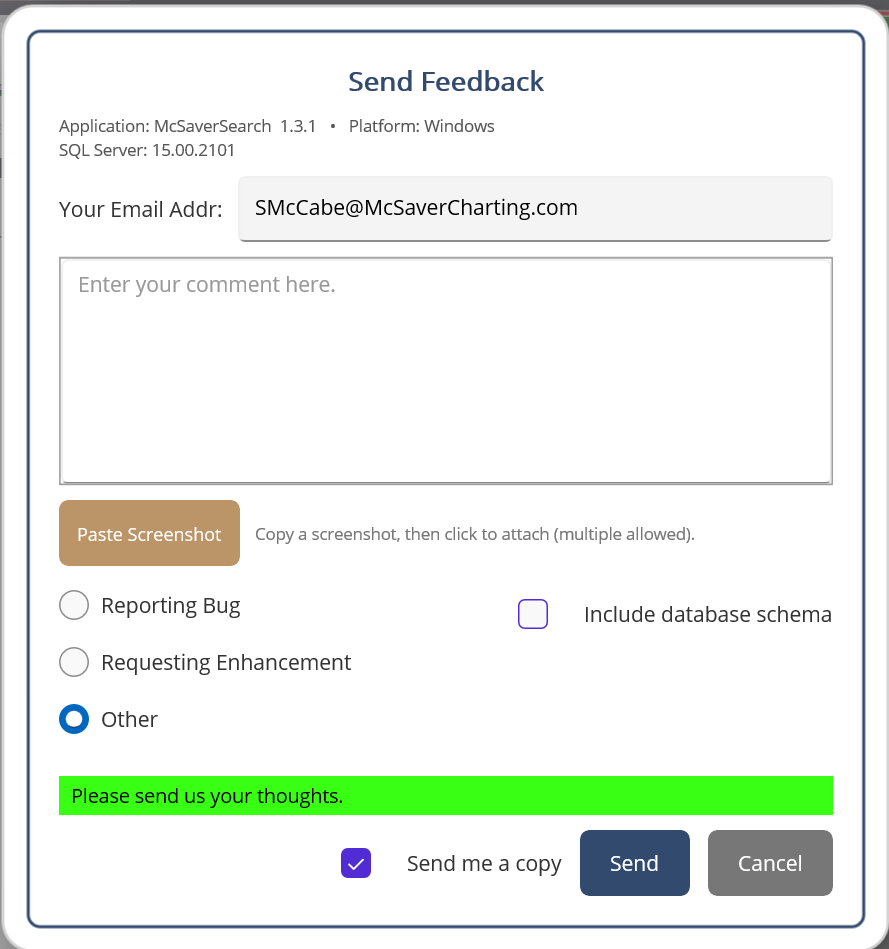
Built right into McSaver Searcher — paste a screenshot, drop us a note, attach your schema if it helps. We read every message, and the next release ships from real user feedback.
Download McSaver Searcher for Windows
One installer. Run it, connect to a SQL Server, and you're querying visually in under a minute. Base features work out of the box — activate Plus later when you're ready.